
SideDrawer + Salesforce: A Native Vault Layer Inside Your CRM
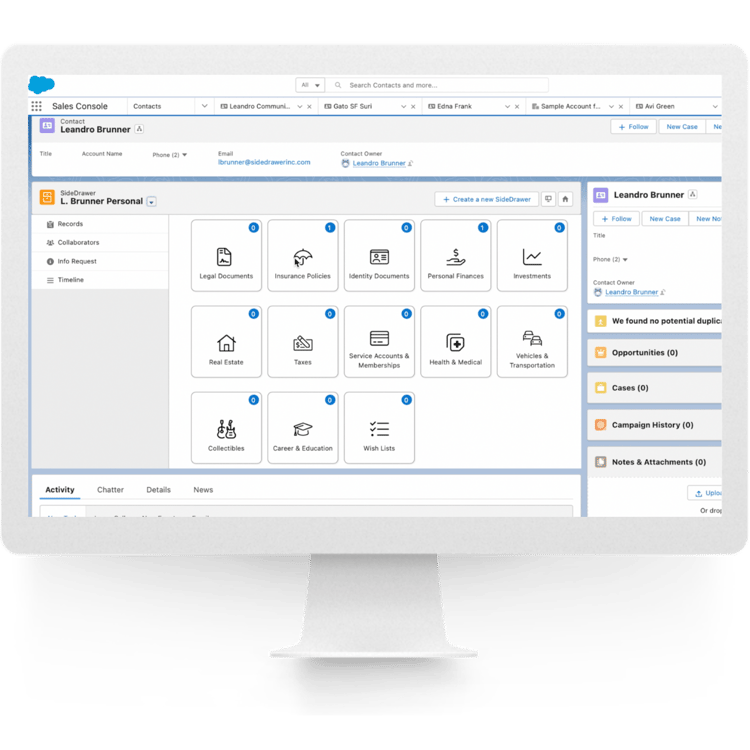
SideDrawer embeds directly into Salesforce as a native Managed Package and Lightning Web Component — so document requests, e-signature, and a compliance-grade audit trail live inside the CRM record your team already works from, with client vaults provisioned automatically the moment a new account is created.
SideDrawer installs directly into Salesforce as a native Managed Package and Lightning Web Component, surfacing a client's document vault right on the account or case record. Vaults provision automatically when a new account is created, notes, messages, and document status sync in real time, and Salesforce users map automatically into SideDrawer's Requester/Respondent roles — all from inside the CRM your team already works in every day.
What SideDrawer Adds Inside Salesforce
Salesforce runs the relationship. These are the client-facing document workflows firms add by pairing it with SideDrawer.
Guided document request composition
A simplified, operational composition layer lets your team assemble complex document requests — uploads, acknowledgments, and signatures — without exposing the underlying technical complexity to the client.
Dynamic requirements determination
A questionnaire-driven engine automatically identifies the correct forms, supplemental documents, and supporting evidence required for the specific transaction or account type — no static checklist to maintain by hand.
Integrated eSignature workflows
Attach e-signature directly to a document request. Signors execute forms electronically, with automated tracking and retrieval of the completed, signed document.
Third-party contributor support
Delegate requests to external parties — solicitors, accountants — through secure, email-based workflows that keep them isolated from sensitive client data they don't need to see.
Centralized document exchange dashboard
A unified workspace inside Salesforce to monitor transfer progress, manage active and closed requests, and resume draft workflows without leaving the CRM.
Automated status derivation & tracking
Parent request statuses — Action Required, Completed — are derived automatically from the real-time progress of individual document items.
Operational upload attribution
Documents provided by the client are visually distinguished from those uploaded operationally by your team or via automated scanning workflows — so it's always clear where a file came from.
Configurable expiry & automated reminders
Set custom expiration periods on a request and let automated inactivity reminders chase completion, instead of your team tracking down outstanding items manually.
A Lightning Web Component built for regulated relationships
SideDrawer's Salesforce integration is a native Managed Package that installs directly into your org. It handles webhook consumption, bell notifications, and automated vault provisioning from inside the CRM, while an API-first, federated data orchestration layer keeps the Digital Vault, the CRM, and external systems in sync — without a centralized data migration.
Connecting SideDrawer to Your Salesforce Org
Adding SideDrawer inside Salesforce doesn't mean disrupting how your team already works the CRM.
Book a demo
Walk through the platform with your own Salesforce org as context.
Install the Managed Package
SideDrawer's native Managed Package installs into your org, wiring up webhook consumption and the Lightning Web Component.
Connect identity
Map Salesforce user context to SideDrawer's Requester/Respondent roles and federate SSO so authentication runs through infrastructure you already use.
Automate provisioning
Configure which CRM events — like new account creation — trigger automated vault provisioning, and the client-facing layer is live.
Frequently Asked Questions
Go Deeper
Digital Vaults 101
The complete guide to what a digital vault is, compliance, cybersecurity, and how to evaluate one.
SideDrawer + Microsoft SharePoint
How SideDrawer pairs with SharePoint as a complementary, not competing, platform.
See how SideDrawer installs into your existing Salesforce org.
Book a 30-minute demo and bring your current Salesforce setup as context.
Book a Demo