
80–100 documents per engagement. Zero of them should arrive over email.
A financial plan requires tax returns, insurance policies, estate documents, investment statements, and pension records. Gathering them over email — with follow-up, version confusion, and scattered attachments — is the norm. It doesn’t have to be.
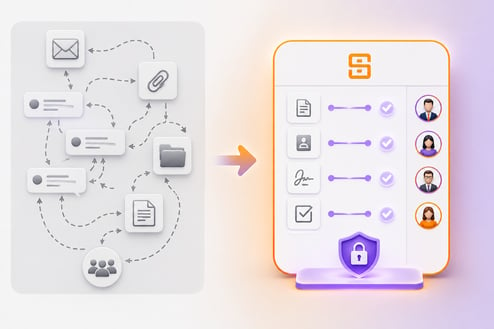
The Document Collection Problem
Financial planning requires 80–100 documents. Collecting them over email is a full-time job.
Follow-up emails that never end
The client didn’t upload the T4. Or they did, but to the wrong email. Or they sent it to the advisor’s personal email instead. Chasing outstanding documents via email is indistinguishable from harassment.
No visibility into what’s been submitted
The planner has no way to see, at a glance, which clients have submitted which documents across all active engagements. Each client requires a manual check of the email thread.
Documents that disappear when the engagement ends
When the planning engagement closes, the document collection lives in the client’s inbox and the planner’s sent folder. There’s no handoff, no archive, and no way for the client to find their own documents two years later.
The Vault Lifecycle
Engage. Collect. Complete. Hand off. Reconnect. The vault stays.
-
Structured document request workflows Clients receive a checklist, not an email; conditional form logic reduces not-in-good-order errors
-
Real-time completion status Planners see what each client has submitted across all active engagements without chasing
-
B2C vault lifecycle Engage → collect → turn over → reconnect; documents persist through the full relationship lifecycle
-
80–100 document collections handled with structure Every item tracked, versioned, and auditable
-
Free consumer plan for client-held vaults Clients keep their documents when the engagement ends
-
Accountant and third-party collaboration Add the accountant as a collaborator for tax season; remove them when it’s done; the vault and its audit trail are unaffected
-
Branded client portal Operates under your firm’s name; clients see your brand, not SideDrawer’s
“Since advisors need so much information from clients to do our job, it can appear irritating if we’re constantly sending emails reminding them. The info request approach to highlighting what’s outstanding is such a better user experience.”Frank Gasper — CSR Wealth
Client Voices
Hear From Our Clients
Financial planners and their clients on what changes when document collection has structure.
When we’re taking a deep dive on financial planning and need a massive data grab with a lot of personal information, Info Requests are the best way to do it. Hands down.
We’ve been using SideDrawer with family members, accountants, and lawyers without any difficulty, and all the while improving the client experience.
Honestly, I think I’m going to love this program. It’s actually comforting to know all of our vital information is in one safe place. If anything suddenly were to happen to either of us, I worried about succession and estate planning for our children.
Built for Financial Planning Workflows
From the first info request to the final plan delivery — one place.
Structured info requests
Define what you need, set the order, add conditional logic. The client sees a clear checklist — not an email asking them to “send over some documents when you get a chance.”
The vault lifecycle
When the engagement ends, hand the vault to the client on the free consumer plan. When they return, the documents are still there. No re-collection. No explaining why you need everything again.
Third-party collaboration
Add the accountant for tax season. Add the estate lawyer for estate planning. Remove them when the work is done. The vault and its permissions update instantly.
A tangible product clients actually use
Financial planners provide intangible services. SideDrawer is the tangible infrastructure: a branded mobile app clients use in their daily lives, not a portal they forget exists.
From Practitioners
The info request tool changes how practices run.
“Tax season was a real eye opener of the impact the platform can have on the efficiency of our practice. We just added the accountant as a Collaborator — and it simplified the entire process.”Frank Gasper — CSR Wealth
“SideDrawer is uniquely our tangible product — something that we offer to our clients that they can actually use in their daily lives, has a branded mobile app.”Mackenzie Stuart — We Listen Financial
deployed
SideDrawer
interaction
data residency
Common Questions
What financial planners ask before they start.
What happens to the vault when the planning engagement ends?
The planner transfers ownership to the client on the free consumer plan. The client keeps all their documents. When the client is ready to engage again, the planner reconnects — and all the documents are already organized. No re-collection required.
Can clients submit documents directly, or do we have to upload everything?
Clients submit directly. The info request sends them a checklist; they upload each item from their device. The planner sees real-time completion status. No email follow-up required.
Do collaborators (accountants, lawyers) cost extra?
No. Collaborators are unlimited and free. You pay per admin user — the planners who manage vaults.
Is Canadian data residency confirmed?
Yes. All data at rest is stored in Canada. SOC 2 Type II certified. AES-256 encryption at rest and in transit.
How do clients access the vault on mobile?
SideDrawer includes a branded mobile app. Clients access their vault on any device — the experience is the same whether they’re on desktop or mobile. The app operates under your firm’s brand.
What if we need conditional logic in our info requests — e.g., ‘if self-employed, also provide T2125’?
Conditional logic is built into the info request workflow. You define the conditions; the client only sees the questions relevant to their situation. This significantly reduces not-in-good-order errors and follow-up requests.
How SideDrawer Works for Financial Planning Firms
Common questions from financial planners. If you need more detail, book a private walkthrough — we’ll walk through the info request workflow and vault lifecycle with your specific practice in mind.
Ready to replace email follow-up with structured document collection?
Book a private walkthrough — we’ll walk through the info request workflow, the vault lifecycle, and how other financial planning firms have replaced their email-based document collection process.
Book a Private Walkthrough
Trusted by financial planners across North America
Real Results from Our Financial Planning Clients